
A monitor arm is the upgrade people wish they had made sooner. Lifting the screen off its stand frees up desk space and lets you set the height, tilt and distance so your neck stays neutral.
We looked at the most popular arms on Amazon and chose six that cover single screens, dual setups, ultrawide monitors and a stacked layout for narrow desks.
As an Amazon Associate I earn from qualifying purchases.
#1 — HUANUO FlowLift Single Monitor Mount (13–32 in)

- Great Adaptability: This HUANUO single monitor arm fits 13-32 inch monitors, holds 4.4-19.8 lbs, suitable for VESA patte…
- Full Adjustable: This PC monitor stand can remain completely stable at any angle without any extra work. Compared with o…
- 80% Sturdier Than Others: At HUANUO, we focus on improving the strength and stability of our single monitor stand. The s…
This single arm handles screens from 13 to 32 inches and lets you raise, lower, tilt and swivel the display with a light push. It is one of the most-reviewed monitor arms on Amazon, which makes it a safe first upgrade from a basic stand. Mounting it clears the space under your screen for a notebook, keyboard tray or desk organizer, and it helps bring the display up to a comfortable eye level.
Best for: One monitor that you adjust often through the day
Verdict: ★★★★☆
#2 — VIVO Dual Monitor Desk Mount (up to 30 in, 22 lb each)

- Fits 13″ to 30″ Screens – Dual monitor mount fitting two screens 13” to 30” in size and up to 22 lbs in weight each with…
- Articulation & Height Adjustment – Adjustable arm offers +90° to -90° tilt, 180° swivel, 360° rotation, and height adjus…
- Heavy Duty C-Clamp – Mounts to the back of your desk (up to 3.25” thick) via a heavy-duty C-clamp or optional grommet mo…
VIVO's dual mount holds two screens up to 30 inches and 22 pounds each on a single heavy-duty pole. It has been a bestseller for years, with a huge number of ratings, because it is simple, sturdy and inexpensive. Each arm can tilt, swivel and rotate, so you can line the screens up side by side or turn one to portrait for reading documents or code.
Best for: Budget-friendly dual-screen setups
Verdict: ★★★★☆
#3 — VIVO Single Ultrawide Monitor Arm (13–38 in)
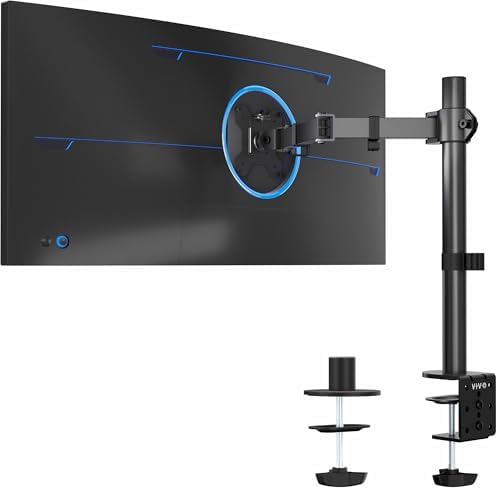
- Screen Compatibility: This single-arm mount fits screens that weigh up to 22 lbs with backside mounting (VESA 75x75mm or…
- Articulation and Height Adjustment: Adjustable arm offers +90° to -90° tilt, 360° swivel, 360° rotation, and height adju…
- Heavy Duty Desk Clamp: Secures to desks (up to 3.25″ thick) with simple hand tightening for toolless installation. An op…
Ultrawide monitors are heavy and wide, so they need an arm built for them. This VIVO mount supports ultrawide screens up to 38 inches (and regular screens up to 32 inches), with a single articulating arm that lets you pull the display closer or push it back. It is a straightforward way to float a big panel above the desk and reclaim the space its bulky stand used to take.
Best for: Ultrawide and larger single monitors
Verdict: ★★★★☆
#4 — ErGear Heavy-Duty Dual Monitor Stand (up to 32 in)

- Computer Compatibility – To ensure compatibility of the dual monitor mount, each of your monitors must meet three condit…
- Two Installation Options – With a detailed instruction manual and labeled hardware, the ErGear monitor mount is a breeze…
- Versatile Compatibility – With a 31.22“ wide arm span and 16” high bar, this dual monitor arm accommodates two 32” monit…
ErGear's dual arm holds two screens up to 32 inches, each on its own adjustable arm so you can position them independently. It is one of the most popular dual mounts on Amazon and a step up in flexibility from single-pole designs. The build suits people who switch between sitting and standing or share the desk, since each screen can be moved without disturbing the other.
Best for: Two monitors that need smooth, independent adjustment
Verdict: ★★★★☆
#5 — HUANUO Stacked Dual Monitor Stand (17–32 in)
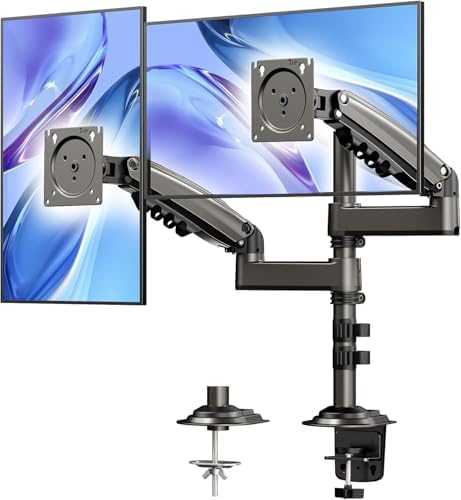
- Fit for Your Monitors – Ensure Compatibility Before Purchase Your monitor must meet all three conditions to be compatibl…
- Extra Height for Better Ergonomics – The dual monitor arm comes with an additional 17-inch extension, elevating your mon…
- Full-Motion Flexibility – With 90° tilt, 180° swivel, and 360° rotation, this monitor stand provides ultimate flexibilit…
When your desk is not wide enough for two monitors side by side, stacking them is the answer. This HUANUO stand mounts one screen above the other on a single pole, keeping the footprint of a single display while doubling your screen space. It fits monitors from 17 to 32 inches and works well for dashboards, chat windows or reference documents above your main screen.
Best for: Narrow desks where side-by-side screens will not fit
Verdict: ★★★★☆
#6 — Amazon Basics Gas Spring Single Monitor Arm (15–27 in)

- Adjustable Gas Spring Tension for Stable Positioning: Designed to support monitors from 4.4–15.4 lbs. Proper tension adj…
- Pre-Tightened Joints for Secure Transport: Joints may feel stiff out of the box to maintain stability during shipping. A…
- VESA Compatibility with Installation Guidance: Supports 75x75mm and 100x100mm VESA patterns. Ensure correct screw length…
This Amazon Basics arm uses a gas spring with adjustable tension, so once it is tuned to your monitor's weight the screen glides into place and stays there. It is sized for common 15 to 27 inch displays, which covers most home office monitors. It is a clean, no-frills choice if you want the smooth feel of a gas spring arm from a familiar brand.
Best for: Standard 24–27 inch monitors on a simple setup
Verdict: ★★★★☆
Buyer’s Guide: How to Choose
Check VESA and weight
Your monitor needs VESA mounting holes on the back (usually 75×75 or 100×100 mm), and its weight must sit inside the arm's supported range.
Clamp or grommet?
Most arms attach with a C-clamp on the desk edge or through a grommet hole. Check your desktop thickness and whether there is a lip or crossbar underneath.
Gas spring vs. mechanical
Gas spring arms glide into position and are easy to adjust many times a day; mechanical arms are simpler and often cheaper but need tools to reposition.
Set the height right
The top of the screen should sit at or slightly below eye level, about an arm's length away.
Final Thoughts
For a single screen, the HUANUO FlowLift mount is the easy pick. Dual-monitor users should look at the VIVO dual desk mount, which has one of the largest review bases in the category, while the HUANUO stacked stand is the smart choice for a narrow desk.
Keep building your setup: read our guides to the best desk lamps and standing desks.